
We all have fun and enjoy when we use WordPress, don’t we?
So much so, that we are oblivious to the fact that this is one of those website that gets hacked more than others. Yes, you heard me right. (PS: The fix is at the end of this blog)
What is WordPress?
Silly Question right. But hey, many of our audience are not-so-technical (geek-coughhh) . Jokes apart. Let’s get to the point.
WordPress is a tool that is used to create websites and is open source, hence there exists no copyright issues whatsoever. The process to create website is simple and user-friendly. In real world, people won’t prefer to code in HTML, JavaScript or CSS to build their website.
They’d rather use WordPress for a free website creation.Being the most widespread CMS (content management system), WordPress is indeed famous!
How Prevalent is WordPress?
WordPress hosts 37% of total websites over the internet, so it is no privy that it is more vulnerable to online attacks.
The hacker’s tool:
The tool used to hack WordPress is called WPScan, acronym for WordPress scan. WPScan is a security scanner of WordPress. It is open source and is used to scan a given WordPress website to find a vulnerability in WordPress. WPScan is a black-box security scanner hence it resembles a real-world attack
Now Let’s talk Statistics and Numbers:
Based on the study conducted by sucuri.net in 2016, Out of total of 8,000 websites that were infected ,74% of them were developed using WordPress.
In 2018, 90% of all hacked CMS (content management system) was WordPress. Two years (2017- 2018) comparison showed a 7% increment in WordPress attacks:
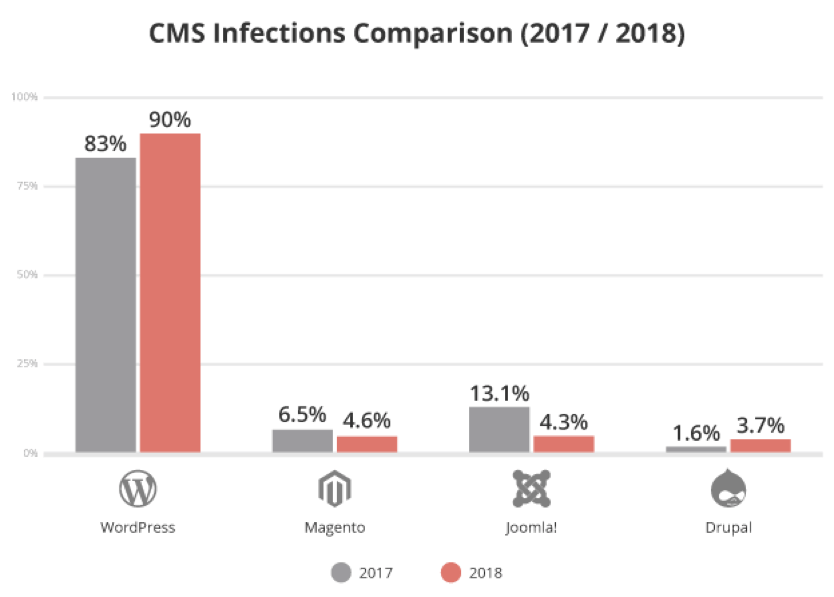
The same attack comparison for next two years (2018-2019), showed an increase of 4% in WordPress infections:
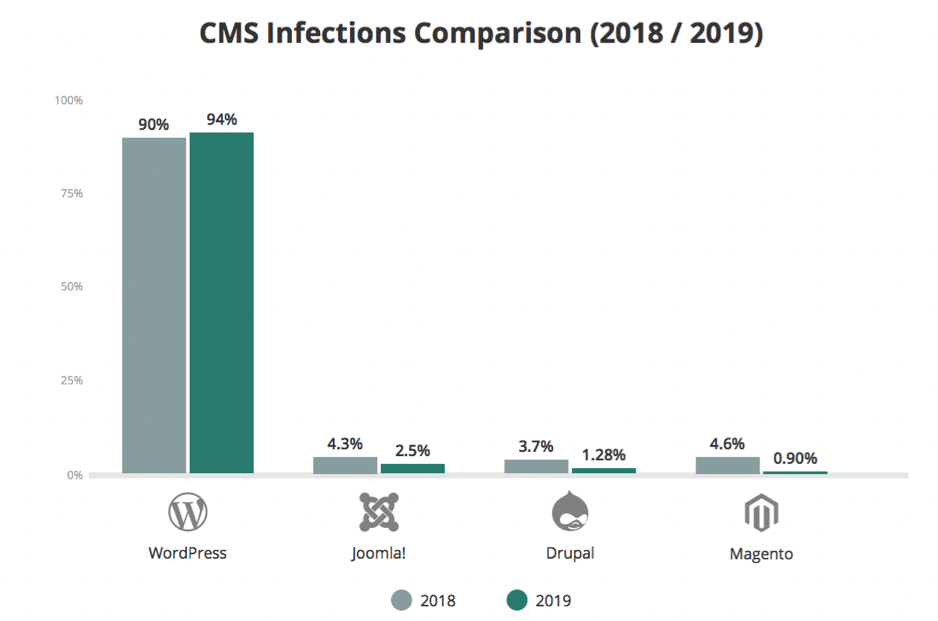
But nothing to worry. As scary as it sounds, WordPress comes to the rescue. Yes, you can prevent your website getting hacked:
To prevent WordPress attacks:
1.Limit the number of login attempts to prevent brute force attacks.
2.Reject the browsers request to save passwords as cookies
3.Use a WordPress security plugin.
Ensuring these steps will help protect your WordPress. Happy WordPressing!
 TechSavvy