
As we all know, Named Access Control Lists (ACLs) permits standard and extended ACLs to be given names instead of numbers.
In this blog, We will configure named ACLs in the two routers to implement the security policy outlined below (only IPv4 needs to be considered). Note: this policy ignores DNS.
Consider following network:
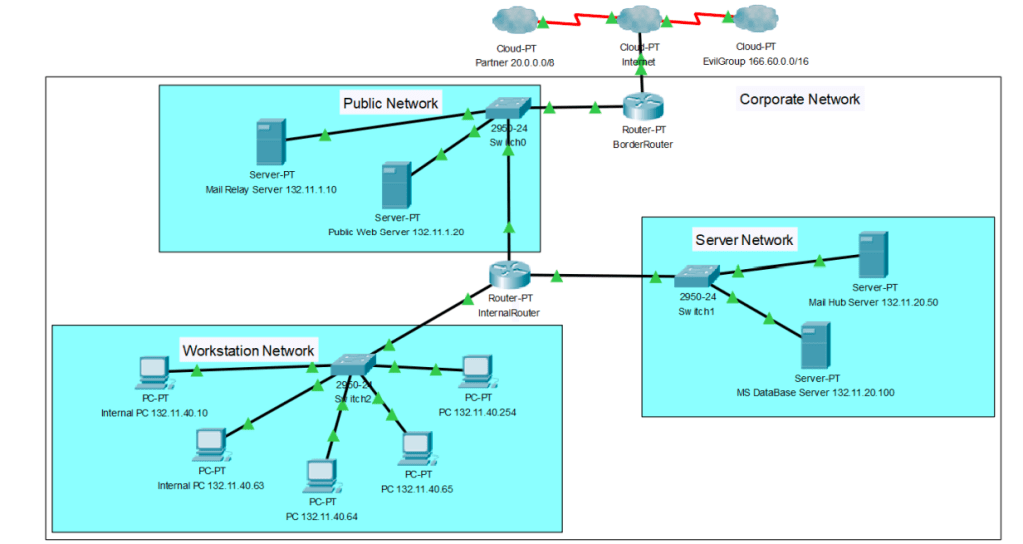
As we can observe, This network has the following components:
• The Internet: any machine.
• Partner (class A network 20.0.0.0/8): a business partner with privileged access rights.
• Evil Group (class B network 166.60.0.0/16): known to have malicious intent.
• Your own corporate network (class B network 132.11.0.0/16), which has the subnets
132.11.1.0/24 Public Server Network, 132.11.20.0/24 Internal Server Network,
132.11.40.0/24 Workstation Network.
The Border Router in the Corporate Network has the following interfaces:
• FastEthernet 0/0: Connected to the ISP (Internet), IP address 10.10.10.10
• FastEthernet 1/0: Connected to the Public Network, IP address 132.11.1.1
The Internal Router in the Corporate Network has the following interfaces:
• FastEthernet 0/0: Connected to the Public Network, IP address 132.11.1.2
• FastEthernet 1/0: Connected to the Server Network, IP address 132.11.20.1
• FastEthernet 2/0: Connected to the Workstation Network, IP address 132.11.40.1
The Public Server Network contains the following servers:
• Mail Relay Server 132.11.1.10
• Public Web Server (HTTPS only) 132.11.1.20
The Internal Server Network contains the following servers:
• Mail Hub Server 132.11.20.50
• MS DataBase Server (MSSQL) 132.11.20.100
The Workstation Network contains the following machines:
• Internal PCs and Workstations 132.11.40.1-254 (even though 132.11.40.1. is the interface
of the router, treat it as if it was a PC)
Security Policy:
• Perform sensible ingress and egress filtering .
• Any packets with a source IP address from EvilGroup are denied access to any machine in the corporate network (in the following items “everybody”/”any” excludes EvilGroup).
• Any machine can access Mail Relay server 132.11.1.10:T25 (only other mail servers are
expected to do so). Machines are expected to use source port TCP/25 to connect to the Mail Relay Server (any:T25 to 132.11.1.10:T25).
• Mail Relay Server can access any outside machine and also Mail Hub Server for SMTP
(132.11.1.10:T25 to any:T25 and to 132.11.20.50:T25).
• Everybody can access the Web server 132.11.1.20 via HTTPS (TCP/443) only – make sure the client cannot use any server port (1-1023) (any:T>=1024 to 132.11.1.20:T443).
• Web server can only initiate connections to the DataBase Server (132.11.1.20:T>=1024 to
132.11.20.100:T1433). All other traffic originating in the web server must be return traffic to HTTPS requests.
• DataBase Server (132.11.20.100) can only be accessed by Web server (132.11.1.20), your own workstations (132.11.40.0/24) and your business partner (20.0.0.0/8) using MS SQL queries (machines:T>=1024 to 132.11.20.100:T1433). It can only react to requests and is not allowed to initiate connections.
• Internal Mail Hub Server 132.11.20.50 can only initiate connections to Mail Relay Server
(SMTP, 132.11.20.50:T25 to 132.11.1.10:T25), receive (and respond to) requests from Mail
Relay Server (SMTP, 132.11.1.10:T25 to 132.11.20.50:T25) and from Workstations (IMAP and SMTP, 132.11.40.x:T>=1024 to 1323.11.20.50:T143,T587).
• Internal PCs and Workstations in the Workstation Network can only access:
o Any web server (including Public Web Server 132.11.1.20) via HTTPS
(132.11.40.x:T>=1024 to any:T443).
o Your own DataBase Server (136.201.20.100) for MS SQL queries (132.11.40.x:T>=1024
to 132.11.20:T1433).
o Mail Hub Server for IMAP and SMTP (132.11.40.x:T>=1024 to 132.11.20:T143,T587)
o Workstations & PCs must use client ports (>1023) for all communication.
• Make sure that only traffic that is a response to a request from any of the
workstations/internal PCs can reach the Workstation Network! You must use reflexive ACLs
for this purpose.
• Make sure to configure your ACLs such that some form of routing protocol (RIP, EGP, BGP or any other you like) can reach your router.
• All other connections should be denied.
Let’s begin writing/designing the Named ACL Firewall rules as mentioned above from Security Policy:
FOR BORDER ROUTER
(20) BorderRouter#conf t
(30) BorderRouter(config)#ip access-list extended inACL_fa0/0
(40) BorderRouter(config-ext-nacl)#deny ip 166.60.0.0 0.0.255.255 132.11.0.0 0.0.255.255
(50) BorderRouter(config-ext-nacl)#permit tcp any eq 25 host 132.11.1.10 eq 25
(60) BorderRouter(config-ext-nacl)#permit tcp any gt 1023 host 132.11.1.20 eq 443 reflect BACK-HTTPS-WEB-SERVER-2
(70) BorderRouter(config-ext-nacl)#permit tcp 20.0.0.0 0.255.255.255 gt 1023 host 132.11.20.100 eq 1443
(80) BorderRouter(config-ext-nacl)#evaluate BACK-HTTPS-ANY-WEB-SERVER-2
(90) BorderRouter(config-ext-nacl)#permit tcp any eq bgp any eq bgp
(100) BorderRouter(config-ext-nacl)#deny ip any any
(110) BorderRouter(config-ext-nacl)#exit
(120) BorderRouter(config)# ip access-list extended outACL_fa0/0
(130) BorderRouter(config-ext-nacl)#permit tcp host 132.11.1.10 eq 25 any eq 25
(140) BorderRouter(config-ext-nacl)#evaluate BACK-HTTPS-WEB-SERVER-2
(150) BorderRouter(config-ext-nacl)#permit tcp host 132.11.20.100 eq 1443 20.0.0.0 0.255.255.255 gt 1023
(160) BorderRouter(config-ext-nacl)#permit tcp 132.11.40.0 0.0.0.255 gt 1023 any eq 443 reflect BACK-HTTPS-ANY-WEB-SERVER-2
(170) BorderRouter(config-ext-nacl)#permit tcp any eq bgp any eq bgp
(180) BorderRouter(config-ext-nacl)#deny ip any any
(190) BorderRouter(config-ext-nacl)#exit
(200) BorderRouter(config)# ip access-list extended inACL_fa1/0
(210) BorderRouter(config-ext-nacl)#permit tcp host 132.11.1.10 eq 25 any eq 25
(220) BorderRouter(config-ext-nacl)#evaluate BACK-HTTPS-WEB-SERVER-1
(230) BorderRouter(config-ext-nacl)#permit tcp host 132.11.20.100 eq 1443 20.0.0.0 0.255.255.255 gt 1023
(240) BorderRouter(config-ext-nacl)#permit tcp 132.11.40.0 0.0.0.255 gt 1023 any eq 443 reflect BACK-HTTPS-ANY-WEB-SERVER-1
(250) BorderRouter(config-ext-nacl)#permit tcp any eq bgp any eq bgp
(260) BorderRouter(config-ext-nacl)#deny ip any any
(270) BorderRouter(config-ext-nacl)#exit
(280) BorderRouter(config)# ip access-list extended outACL_fa1/0
(290) BorderRouter(config-ext-nacl)#permit tcp any eq 25 host 132.11.1.10 eq 25
(300) BorderRouter(config-ext-nacl)#permit tcp any gt 1023 host 132.11.1.20 eq 443 reflect BACK-HTTPS-WEB-SERVER-1
(310) BorderRouter(config-ext-nacl)#permit tcp 20.0.0.0 0.255.255.255 gt 1023 host 132.11.20.100 eq 1443
(320) BorderRouter(config-ext-nacl)#evaluate BACK-HTTPS-ANY-WEB-SERVER-1
(330) BorderRouter(config-ext-nacl)#permit tcp any eq bgp any eq bgp
(340) BorderRouter(config-ext-nacl)#deny ip any any
(350) BorderRouter(config-ext-nacl)#exit
(360) BorderRouter(config)#int FastEthernet0/0
(370) BorderRouter(config-if)# ip access-group inACL_fa0/0in
(380) BorderRouter(config-if)# ip access-group outACL_fa0/0 out
(390) BorderRouter(config-if)# exit
(400) BorderRouter(config)#int FastEthernet1/0
(410) BorderRouter(config-if)# ip access-group inACL_fa1/0 in
(420) BorderRouter(config-if)# ip access-group outACL_fa1/0 out
(430) BorderRouter(config-if)# exit
(440) BorderRouter(config)#end
(450) BorderRouter#write
FOR INTERNAL ROUTER
(480) InternalRouter#conf t
(490) InternalRouter(config)#ip access-list extended inACL_fa0/0
(500) InternalRouter(config-ext-nacl)#permit tcp host 132.11.1.10 eq 25 host 132.11.20.50 eq 25
(510) InternalRouter(config-ext-nacl)#evaluate BACK-HTTPS-WEB-SERVER-3
(520) InternalRouter(config-ext-nacl)#permit tcp host 132.11.1.20 gt 1023 host 132.11.20.100 eq 1443 reflect SQL-RESPONSE-1
(530) InternalRouter(config-ext-nacl)#permit tcp 20.0.0.0 0.255.255.255 gt 1023 host 132.11.20.100 eq 1443
(550) InternalRouter(config-ext-nacl)#evaluate BACK-HTTPS-ANY-WEB-SERVER-1
(560) InternalRouter(config-ext-nacl)#permit tcp any eq bgp any eq bgp
(570) InternalRouter(config-ext-nacl)#deny ip any any
(580) InternalRouter(config-ext-nacl)#exit
(590) InternalRouter(config)#ip access-list extended outACL_fa0/0
(600) InternalRouter(config-ext-nacl)#permit tcp any eq 25 host 132.11.1.10 eq 255
(610) InternalRouter(config-ext-nacl)#evaluate SQL-RESPONSE-1
(620) InternalRouter(config-ext-nacl)#permit tcp any gt 1023 host 132.11.1.20 eq 443 reflect BACK-HTTPS-WEB-SERVER-3
(630) InternalRouter(config-ext-nacl)#permit tcp host 132.11.20.100 eq 1443 20.0.0.0 0.255.255.255 gt 1023
(640) InternalRouter(config-ext-nacl)#permit tcp host 132.11.20.50 eq 25 host 132.11.1.10 eq 25
(650) InternalRouter(config-ext-nacl)#permit tcp 132.11.40.0 0.0.0.255 gt 1023 any eq 443 reflect BACK-HTTPS-ANY-WEB-SERVER-1
(660) InternalRouter(config-ext-nacl)#permit tcp any eq bgp any eq bgp
(670) InternalRouter(config-ext-nacl)#deny ip any any
(680) InternalRouter(config-ext-nacl)#exit
(690) InternalRouter(config)#ip access-list extended inACL_fa1/0
(700) InternalRouter(config-ext-nacl)#permit tcp any eq 25 host 132.11.1.10 eq 25
(710) InternalRouter(config-ext-nacl)#permit tcp any gt 1023 host 132.11.1.20 eq 443 reflect BACK-HTTPS-WEB-SERVER-2
(720) InternalRouter(config-ext-nacl)#evaluate SQL-RESPONSE-2
(730) InternalRouter(config-ext-nacl)#permit tcp host 132.11.20.100 eq 1443 20.0.0.0 0.255.255.255 gt 1023
(740) InternalRouter(config-ext-nacl)#permit tcp host 132.11.20.50 eq 25 host 132.11.1.10 eq 25
(750) InternalRouter(config-ext-nacl)#evaluate BACK-IMAP-2
(760) InternalRouter(config-ext-nacl)#evaluate BACK-SMTP-2
(770) InternalRouter(config-ext-nacl)#evaluate BACK-MSSQL-SERVER-2
(780) InternalRouter(config-ext-nacl)#deny ip any any
(790) InternalRouter(config-ext-nacl)#exit
(800) InternalRouter(config)#ip access-list extended outACL_fa1/0
(810) InternalRouter(config-ext-nacl)#permit tcp host 132.11.1.10 eq 25 host 132.11.20.50 eq 25
(820) InternalRouter(config-ext-nacl)#evaluate BACK-HTTPS-WEB-SERVER-2
(830) InternalRouter(config-ext-nacl)#permit tcp host 132.11.1.20 gt 1023 host 132.11.20.100 eq 1443 reflect SQL-RESPONSE-2
(850) InternalRouter(config-ext-nacl)#permit tcp 20.0.0.0 0.255.255.255 gt 1023 host 132.11.20.100 eq 1443
(870) InternalRouter(config-ext-nacl)#permit tcp 132.11.40.0 0.0.0.255 gt 1023 host 132.11.20.50 eq 143 reflect BACK-IMAP-2
(880) InternalRouter(config-ext-nacl)#permit tcp 132.11.40.0 0.0.0.255 gt 1023 host 132.11.20.50 eq 587 reflect BACK-SMTP-2
(890) InternalRouter(config-ext-nacl)#permit tcp 132.11.40.0 0.0.0.255 gt 1023 host 132.11.20.100 eq 1443 reflect BACK-MSSQL-SERVER-2
(900) InternalRouter(config-ext-nacl)#deny ip any any
(910) InternalRouter(config-ext-nacl)#exit
(920) InternalRouter(config)#ip access-list extended inACL_fa2/0
(930) InternalRouter(config-ext-nacl)#permit tcp any gt 1023 host 132.11.1.20 eq 443 reflect BACK-HTTPS-WEB-SERVER-1
(950) InternalRouter(config-ext-nacl)#permit tcp 132.11.40.0 0.0.0.255 gt 1023 host 132.11.20.50 eq 143 reflect BACK-IMAP-1
(960) InternalRouter(config-ext-nacl)#permit tcp 132.11.40.0 0.0.0.255 gt 1023 host 132.11.20.50 eq 587 reflect BACK-SMTP-1
(970) InternalRouter(config-ext-nacl)#permit tcp 132.11.40.0 0.0.0.255 gt 1023 any eq 443 reflect BACK-HTTPS-ANY-WEB-SERVER-2
(980) InternalRouter(config-ext-nacl)#permit tcp 132.11.40.0 0.0.0.255 gt 1023 host 132.11.20.100 eq 1443 reflect BACK-MSSQL-SERVER-1
(990) InternalRouter(config-ext-nacl)#deny ip any any
(1000) InternalRouter(config-ext-nacl)#exit
(1010) InternalRouter(config)#ip access-list extended outACL_fa2/0
(1020) InternalRouter(config-ext-nacl)#evaluate BACK-HTTPS-WEB-SERVER-1
(1030) InternalRouter(config-ext-nacl)#evaluate BACK-IMAP-1
(1040) InternalRouter(config-ext-nacl)#evaluate BACK-SMTP-1
(1050) InternalRouter(config-ext-nacl)#evaluate BACK-HTTPS-ANY-WEB-SERVER-2
(1060) InternalRouter(config-ext-nacl)#evaluate BACK-MSSQL-SERVER-1
(1070) InternalRouter(config-ext-nacl)#deny ip any any
(1080) InternalRouter(config-ext-nacl)#exit
(1090) InternalRouter(config)#int FastEthernet0/0
(1100) InternalRouter(config-if)#ip access-group inACL_fa0/0 in
(1110) InternalRouter(config-if)#ip access-group outACL_fa0/0 out
(1120) InternalRouter(config-if)#exit
(1130) InternalRouter(config)#int FastEthernet1/0
(1140) InternalRouter(config-if)#ip access-group inACL_fa1/0 in
(1150) InternalRouter(config-if)#ip access-group outACL_fa1/0 out
(1160) InternalRouter(config-if)#exit
(1170) InternalRouter(config)#int FastEthernet2/0
(1180) InternalRouter(config-if)#ip access-group inACL_fa2/0 in
(1190) InternalRouter(config-if)#ip access-group outACL_fa2/0 out
(1200) InternalRouter(config-if)#exit
(1210) InternalRouter(config)#end
(1220) InternalRouter#write
The order we follow to write above rules, depends on where the traffic is passing from (ie.which router) and from which interface/s of that router and whether the traffic is inbound or outbound.
Now that we have designed the NAMED ACL as per the security policy, let us detail which firewall rule(s) will be used to process the discussed traffic: If a packet is passed through a firewall, we name all firewall rules (identified by their unique line number) that pass the packet.
Similarly, if a packet is dropped by a firewall, we name the firewall rule that drops the packet. If a packet is processed by two firewalls, we made sure to include the rules from each firewall. Also, for each passed packet, we name the firewall rule(s) that would process the corresponding return traffic (if any response is expected).
● Machine 166.60.6.6:T4077 sends a HTTPS request to public web server 132.11.11.20:T443.
DROPPED, 40 ( Rule 40 states: (40) deny ip 166.60.0.0 0.0.255.255 132.11.0.0 0.0.255.255)
From this rules we can see that all traffic from the network 166.60.0.0 to network 132.11.0.0 is denied. Hence HTTPS request to public web server 132.11.11.20:T443 is denied as well.
Similarly we proceed with other flow of traffic :
● Machine 166.60.6.6 uses spoofed source IP address 132.11.40.10:T12345 to send a HTTPS request to Public Web Server 132.11.1.20:T443.
PERMITTED, 60, 300
● Machine 166.60.6.6 uses spoofed source IP address 172.16.1.1:T25 to send a SMTP query to Mail Relay Server 132.11.1.10:T25.
PERMITTED, 50, 290
● Machine 4.14.54.33:T2233 sends a HTTP request to Web Server 132.11.1.20:T80.
DROPPED 100
● Machine 123.5.4.3:T4321 sends a HTTPS request to Web Server 132.11.1.20:T443.
PERMITTED 60, 300
● Machine 4.14.54.33:T543 sends a HTTPS request to Web Server 132.11.1.20:T443.
DROPPED 100
● Machine 20.200.200.1:T6789 establishes a TCP connection to MS Database Server 132.11.20.100:T1433.
PERMITTED 70, 310, 530, 850
● Machine 20.200.200.1:T1023 establishes connection MS Database Server 132.11.20.100:T1433.
DROPPED 100
● Machine 20.200.200.1:T25 establishes SMTP connection to Mail Hub Server 132.11.20.50:T25.
DROPPED 100
● Router 4.4.4.4 uses your chosen routing protocol with suitable ports (if applicable) to send routing information to border router 10.10.10.10.
PERMITTED 90
● Web Server 132.11.1.20:T443 establishes a TCP connection to machine 211.4.3.2:T6789.
DROPPED 260
● Web Server 132.11.1.20:T6789 establishes a TCP connection MS Database Server 132.11.20.100:T1433
PERMITTED 520,830
● Mail Relay Server 132.11.1.10:T25 establishes TCP connection to outside mail server 155.3.2.14:T25.
PERMITTED 210, 130
● Mail Relay Server 132.11.1.10:T1425 establishes TCP connection to MS Database Server 132.11.20.100:T1433.
DROPPED 570
● Outside mail server 188.33.3.3:T25 establishes a SMTP connection to Mail Relay Server 132.11.1.10:T25.
PERMITTED 50,290
● Mail Hub Server 132.11.20.50:T25 establishes SMTP connection to business partner email server 20.1.1.10:T25.
DROPEED 780
● Mail Hub Server 132.11.20.50:T25 establishes SMTP connection to Mail Relay Server 132.11.1.10:T25.
PERMITTED 640, 740
● MS Database Server 132.11.20.100:T2233 sends a HTTPS request to Web Server 132.11.1.20:T443.
PERMITTED 710, 620
● PC 132.11.40.10:T443 sends a HTTPS request to Web server 20.1.1.1:T443.
DROPPED 990
● PC 132.11.40.10:T1234 sends a HTTPS request to Web server 5.1.2.3:T443.
PERMITTED 970, 650, 240, 160
● PC 132.11.40.10:T1234 establishes SMTP connection to business partner mail server 20.1.1.10:T25.
DROPPED 990
● PC 132.11.40.10:T1234 establishes a connection to retrieve email from Mail Hub Server 132.11.20.50:T143.
PERMITTED 950, 870
● PC 132.11.40.201:T5555 establishes a connection to DataBase Server 132.11.20.100:T1433.
PERMITTED 980, 890
● PC 132.11.40.55:T2044 establishes SMTP connection to Mail Relay Server 132.11.1.10:T25.
DROPPED 990
● Machine 166.60.6.6 uses spoofed source IP address 20.1.1.1:T443 to send a HTTPS response to Internal PC 132.11.40.40:T9876 (without previous request).
DROPPED 100
This was a glimpse of how Named ACLs are configured and same model could be followed in a given company to permit/deny any given traffic based on custom rules.
Thank you for reading and the support.
Copyright: Shubham Bhaskar
 TechSavvy